Many property owners in Singapore want to monitor their driveway, porch, or entrance corridor without drilling through external concrete walls. In condominiums, cluster homes, and commercial shophouses, exterior drilling is often restricted by estate management rules or poses water seepage risks during severe tropical downpours. A practical alternative is mounting an indoor camera flush against a window pane to watch the outdoor space from the safety of an air-conditioned room. Executing an effective window security camera setup in Singapore requires more than pressing an adhesive bracket against glass. You need to account for sun glare, glass tinting, power cable concealment, and Wi-Fi stability.
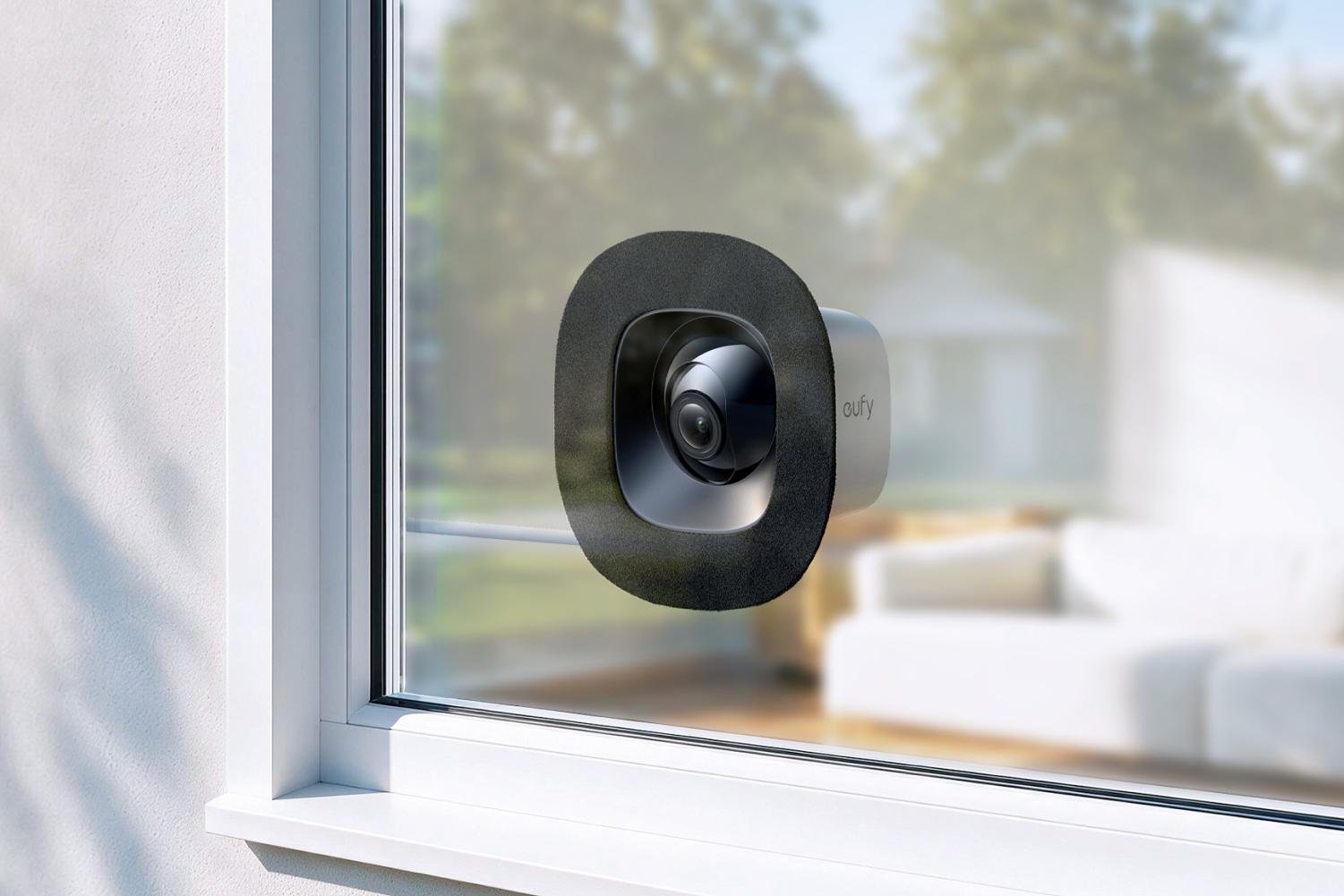
The recent launch of the Anker Eufy Window Camera E10, covered by The Verge, shows how hardware makers are addressing these exact challenges. Priced at 79.99 USD, the E10 features a 2.5K resolution sensor, a 105-degree field of view, an adjustable 25-degree tilt wheel, and a flush-mount adhesive base that reduces reflections. Understanding how to deploy this type of hardware in Singapore properties helps ensure clear footage day and night.
Overcoming Glare in Window Security Camera Setup in Singapore
Positioning a camera behind glass introduces two optical hurdles: daytime sun reflections and nighttime infrared bounce. Many Singapore homes feature solar-control window film, Low-E glass, or double glazing designed to cut tropical heat. When harsh afternoon sun strikes the glass at an acute angle, bright outdoor rays can create washouts if the lens sits several inches back from the pane.
Mounting the camera flush against the interior glass surface eliminates internal room reflections. The E10 uses an adhesive frame that keeps the lens directly on the pane. At night, traditional security cameras turn on infrared illumination bulbs, which reflect off the glass like a mirror and leave the sensor blind to the outside world. The E10 skips infrared lights and relies on color night vision sensors paired with ambient street lighting or porch lamps. If your driveway or front gate receives baseline illumination from nearby street lamps, the sensor captures usable color detail without blinding reflections.
Power Management and Neat Cable Concealment
Because the E10 lacks a rechargeable battery, it requires an uninterrupted wired power feed via a USB cable. In living rooms, bedrooms, or shopfronts, a loose white cable running down a window frame quickly becomes an eyesore. It can also interfere with roller blinds, solar curtains, or sliding window tracks.
Professional installations treat cable management as a core step. Our technicians run thin micro-cables along the perimeter of the window frame, securing them inside color-matched mini trunking that blends with aluminium mullions. When the nearest electrical outlet is more than three meters away, structured Cat6 network cabling paired with a Power over Ethernet (PoE) splitter can supply continuous 5V power over long distances without messy extension cords. You can review our structured wiring approaches through Synoviz cabling and installation services.
Network Optimization and Local Storage Options
Singapore has one of the densest residential wireless environments in the world. In high-rise condominiums and commercial units, dozens of neighboring routers broadcast on overlapping 2.4GHz frequencies. Because 2.5K video streams require consistent wireless throughput, network congestion can cause video feeds to buffer or drop frames during live playback.
To avoid transmission bottlenecks, assign your smart home cameras to an isolated 2.4GHz network channel with minimal local interference, or route them through dedicated access points. For video archiving, the E10 provides an onboard microSD card slot supporting up to 256GB of storage. This gives property owners direct control over their video history without paying ongoing cloud storage fees or sending bandwidth-heavy video streams across the public internet. For larger sites requiring synchronized recording across multiple zones, our team designs integrated architectures through commercial security and IoT solutions.
Deployment Guidance for Landed Homes and Offices
Before applying the adhesive bracket to your window pane, clean the interior glass thoroughly with isopropyl alcohol to remove dust and oily film. Test your viewing angle at midday and dusk using the manual 25-degree tilt adjustment wheel on the back of the camera before finalizing the bracket placement.
For landed properties with wide driveways, mounting the camera on a second-floor window provides a wider vantage point over gates and vehicles. For ground-floor offices, positioning the lens at head height near reception windows offers clear facial identification of visitors approaching the front door.
If you are planning an upgrade to your home or office security and need assistance with hardware selection, clean cable trunking, or wireless network calibration, contact the Synoviz WhatsApp at +65 8933 1660 or email sales@synoviz.com.